
A single scalable multi-tenant Core, with hybrid architecture and experiences adapted to each operating mode.
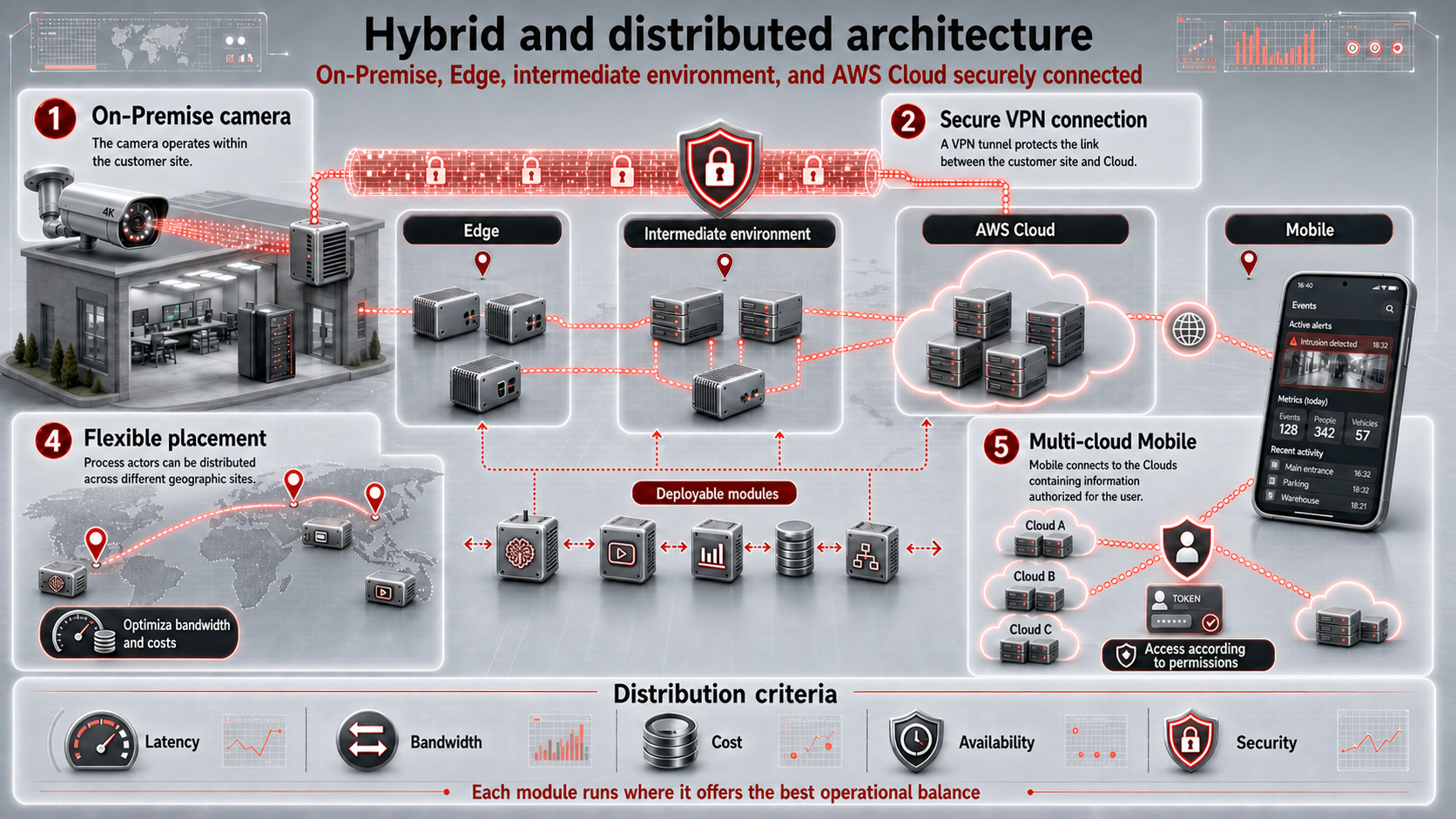
Distributed architecture for cameras, community, IoT, and AI
Horus is organized as a distributed service architecture: cameras and sensors remain at each site, the mobile experience enables operation from anywhere, edge can run workloads close to the capture point, and the cloud environment coordinates identities, permissions, notifications, scenarios, and integrations.
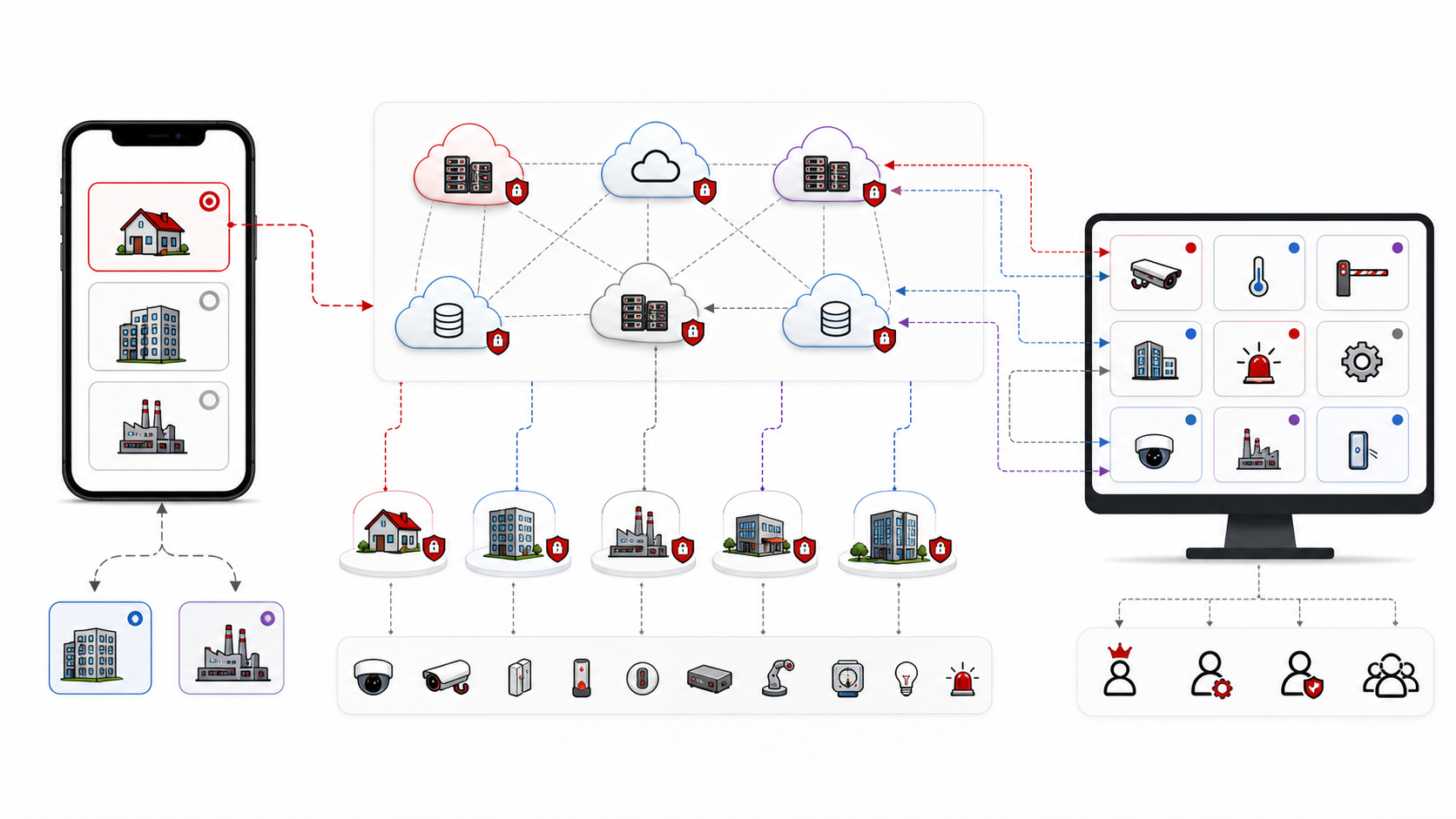
Each Horus instance represents an autonomous environment. Relationships between devices, users, groups, calendars, permissions, and automations exist inside that instance, ensuring operational independence and logical security between different installations or customers.
Connected layers of the ecosystem
Horus by Fidumtec is more than an app, an IoT solution, or a camera system. It is a distributed platform made of connected layers:
- Field: cameras, sensors, actuators, physical devices, and installed infrastructure.
- Gateway / local edge: gateways, adapters, field protocols, and processing close to the site.
- ISP / operator edge: ISP network, datacenter, regional edge, storage, GPU, recording, and inference.
- Horus Cloud: identity, instances, users, permissions, rules, dashboards, events, and multi-tenancy.
- AI and automation: video analytics, intelligent events, rules, scenarios, and automatic or assisted actions.
- Mobile experience / Clipxu: visualization, alerts, field operation, and user interaction.
Points 4, 5, and 6 allow the centralized logic of the architecture to coexist in distributed form across multiple platforms. Horus Cloud is no longer understood as a single cloud; it operates as a network of clouds, including pure cloud nodes, operator clouds, and connected ISP deployments.
Instance-based connection and multi-cloud operation
Each Horus instance belongs to a specific cloud node. That node can be associated with an ISP, a specific cloud region, or a cloud operated within a distributed architecture. The connection is not resolved against one global cloud, but against the cloud node where the instance being operated lives.
In the Clipxu mobile application, the user connects to the cloud node where the Horus instance being configured or operated is registered. If the user switches instances, the active configuration starts pointing to the cloud node corresponding to that new instance.
In a dashboard, the behavior is different: each monitor can represent the visualization or control of a different Horus element. For that reason, dashboard connections are made against the cloud node that owns the Horus instance of each monitored element. A single dashboard can operate, in parallel, elements hosted in ISP clouds, cloud regions, or different cloud nodes.
Vision: one technology platform
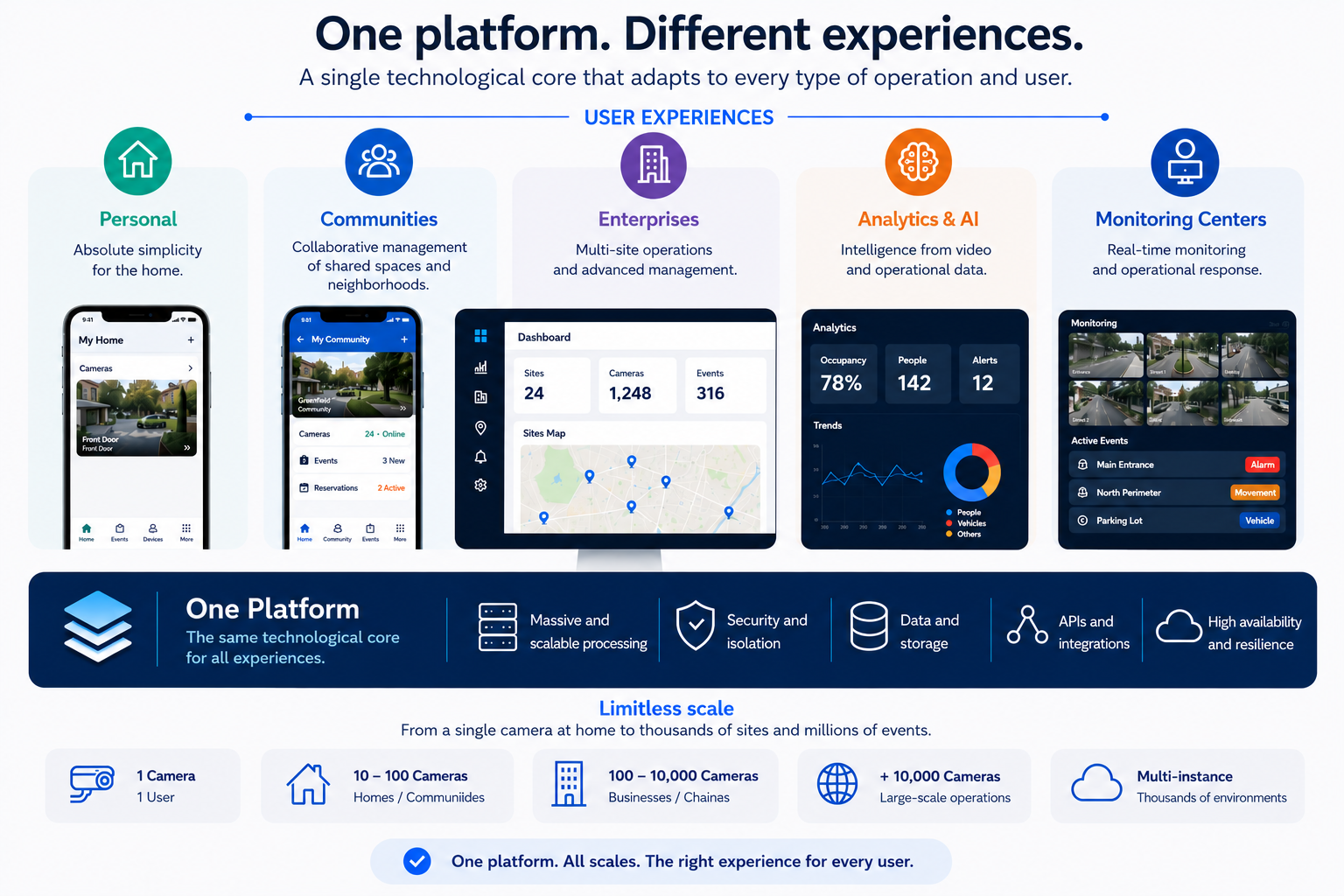
Backend capacity is not defined by the size of an interface or by the number of cameras a typical user manages. Horus was conceived as a multi-tenant platform where each instance preserves its autonomy, users, permissions, devices, and rules, while horizontal processing grows with the available computing capacity.
The same Core can support one camera, a community, a multi-site enterprise, or thousands of instances operating in parallel. There are no “small” and “large” backends: there is one shared platform that distributes workloads, keeps environments isolated, and expands resources without fragmenting the architecture.
Simplicity is an experience decision
Horus hides technical complexity so onboarding and daily operation remain simple. Device discovery, configuration assistants, automations, and direct navigation are product decisions; they are not Core limitations.
When an operation grows from dozens to thousands of cameras, the working model must evolve. An enterprise operation or monitoring center needs advanced search, complex filters, bulk actions, hierarchies, operational dashboards, corporate permissions, auditing, and management by site, region, or branch.
The difference is not processing capacity. What changes is:
- The interface presented to the user.
- The tools made available.
- Configuration, supervision, and response workflows.
- The level of aggregation and operational governance.
Operating modes and scope
| Mode | Experience goal |
|---|---|
| Personal | Absolute simplicity for a focused environment. |
| Community | Collaborative management of spaces, neighbors, permissions, and events. |
| Enterprise | Hierarchical, multi-site operation with bulk administration tools. |
| Analytics and AI | Exploration of large volumes of events, metrics, and operational data. |
| Monitoring center | Real-time supervision, incident prioritization, and coordinated response. |
Every mode uses the same backend. A specialized experience can evolve without duplicating services, artificially separating data, or creating a parallel platform.
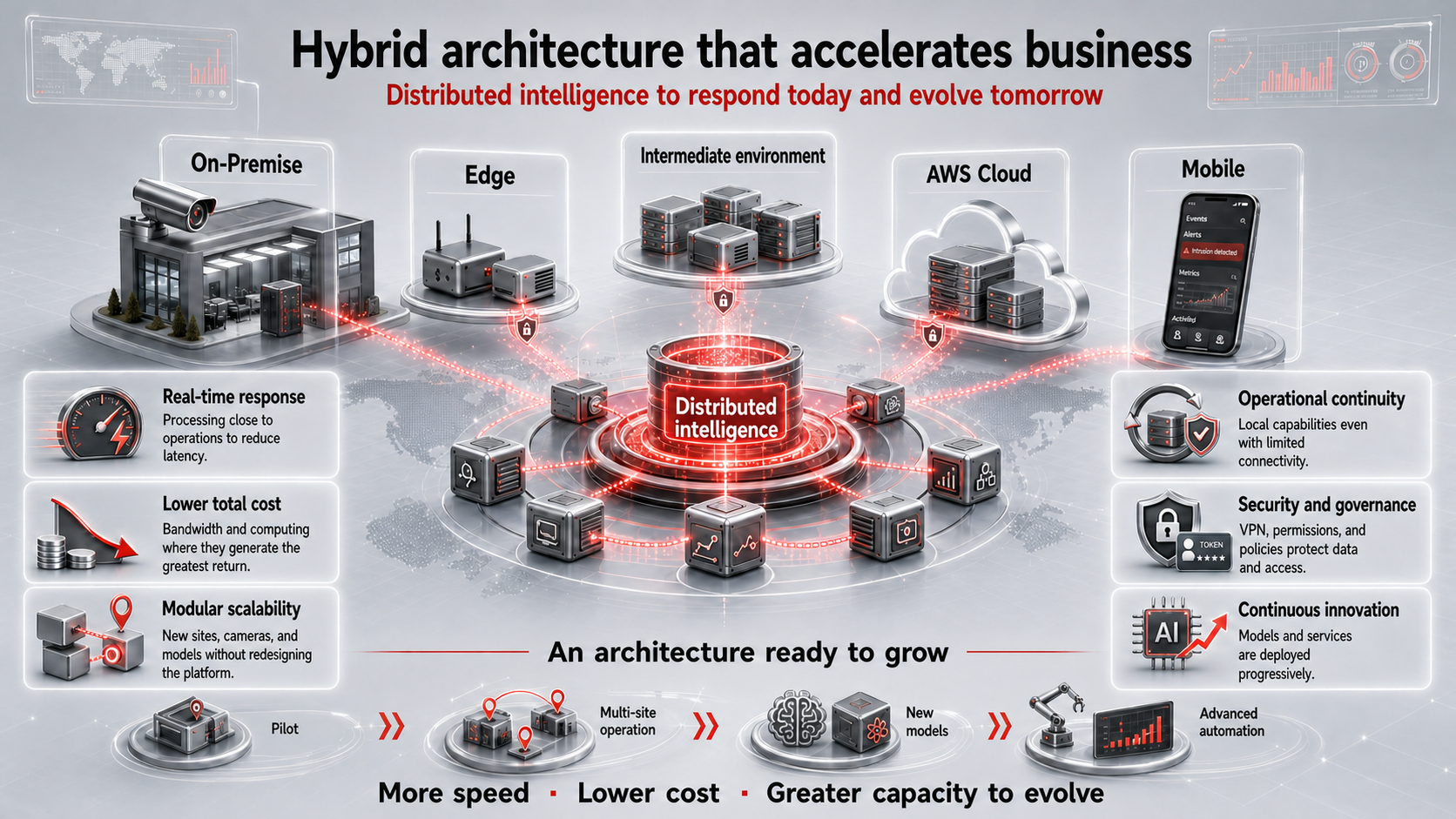
Hybrid architecture: process where it adds the most value
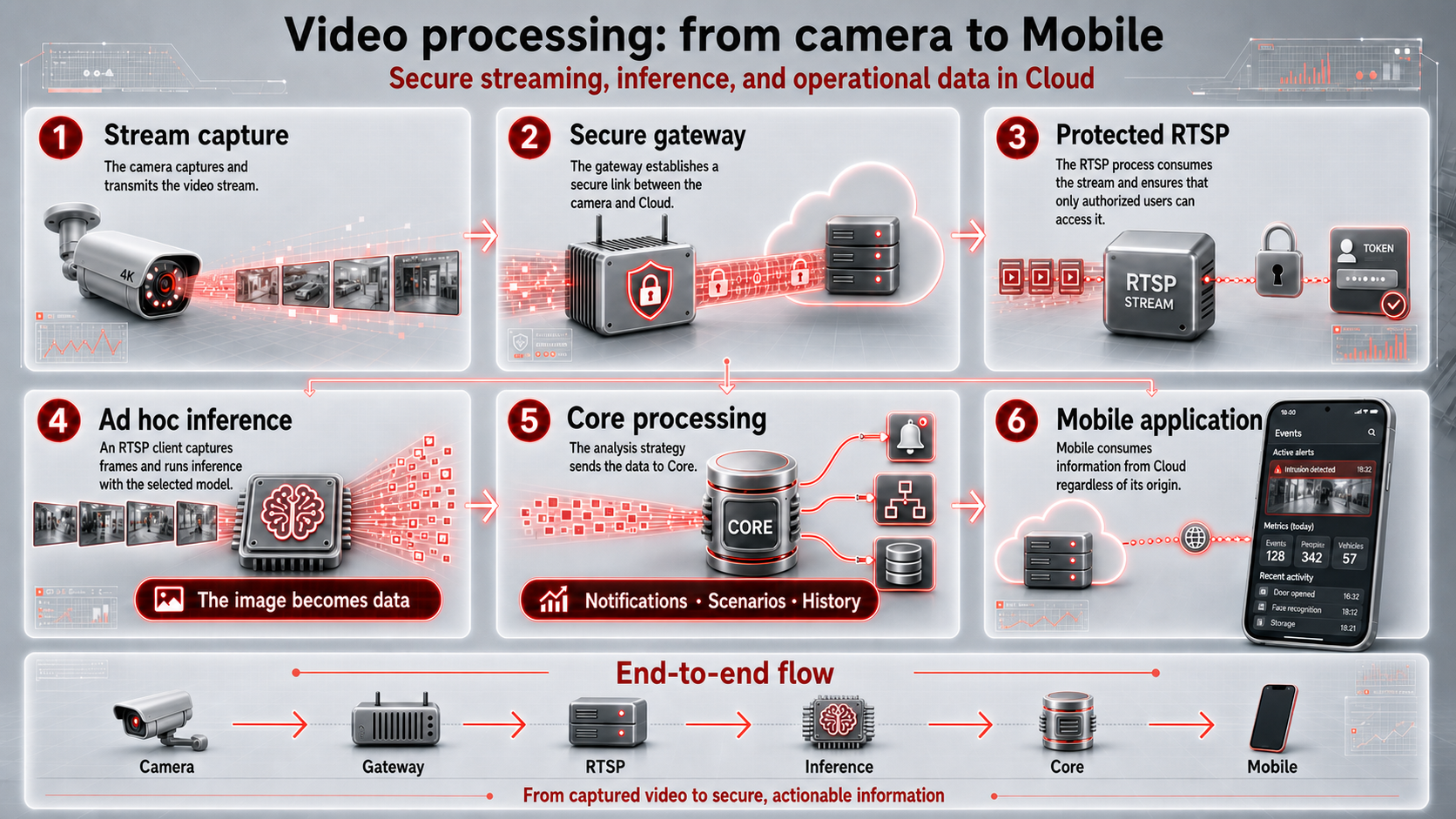
Cameras remain at the customer site and connect securely to the service infrastructure. Depending on the requirement, modules can run at the local edge, in an intermediate environment with low latency and available bandwidth, or in the cloud. This flexibility balances latency, traffic, cost, availability, and governance.
Streaming is protected from the gateway through the access layer. Specialized processes consume authorized video and turn images into events or data; the Core coordinates rules, notifications, scenarios, and history, while the mobile experience consumes information regardless of where it was produced.
One Core, different ecosystem expressions
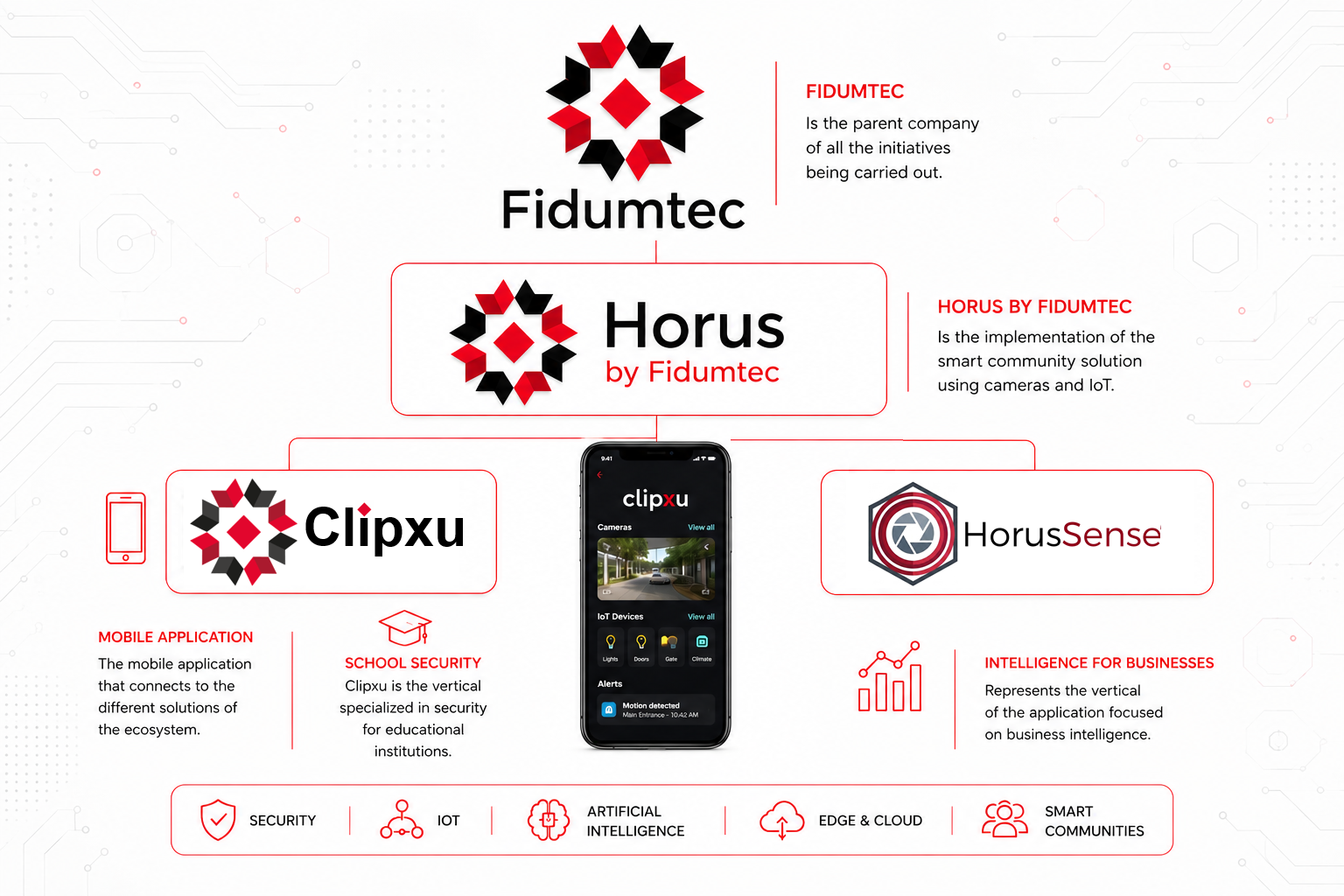
The Horus “flavors” are not incompatible backends. They are different ways to use the same technology core:
- Horus brings together intelligent communities, cameras, IoT, permissions, and automation.
- HorusSense focuses the platform on analytics, AI, and business intelligence.
- Clipxu provides the mobile experience for visualization, alerts, and operation.
- Fidumtec integrates and institutionally supports the ecosystem and its verticals.
This separation adapts the commercial proposition and experience without fragmenting backend development. The Core remains unique; each expression selects the capabilities, interfaces, and workflows suited to its context.
1. Cameras and sites
- Cameras are onboarded using standards such as ONVIF.
- A single user can operate owned cameras or views shared by third parties.
- The platform avoids depending on each manufacturer's proprietary cloud.
2. Cloud, edge, and mobile experience
- Manages users, groups, cameras, permissions, and communities.
- Defines 24/7 access windows or temporary permissions with start and end dates.
- Coordinates specific notifications for linked users.
- Maintains personalized dashboards according to each user's permissions.
- Allows Clipxu to act as the mobile experience for visualization, alerts, and operation.
- Provides the foundation for deployments such as ISP, IoT, communities, and critical infrastructure.
3. Sensors, actions, and AI
- Integrates selected IoT sensors to complement camera information.
- Can execute remote physical actions using IoT devices.
- Processes video images with inference engines to generate events and information for the user.
- Enables rules based on events, logical conditions, sensor states, schedules, calendars, and user presence.